How to buy FIFA World Cup package in 12 cable operators through eSewa Payment?
 Hamro Colleges Published November 19, 2022
Updated January 6, 2023 1 min read
Hamro Colleges Published November 19, 2022
Updated January 6, 2023 1 min read

DishHome, WorldLink NetTV, WorldLink NetTV-Epay, ViaTV, Subisu/ClearTV, Mero TV, MaxTV, Prabhu TV, SimTV, BBN TV, and Skycom have reached a deal with Media Hub to display the newly established Himalaya Premium channel and charge consumers to unlock it.
We’ll teach you how to pay the fees digitally. Just follow the instructions below to pay for all nine cable operators.
- Open the eSewa app on your device and choose ‘World Cup bundles’ from the top left menu.
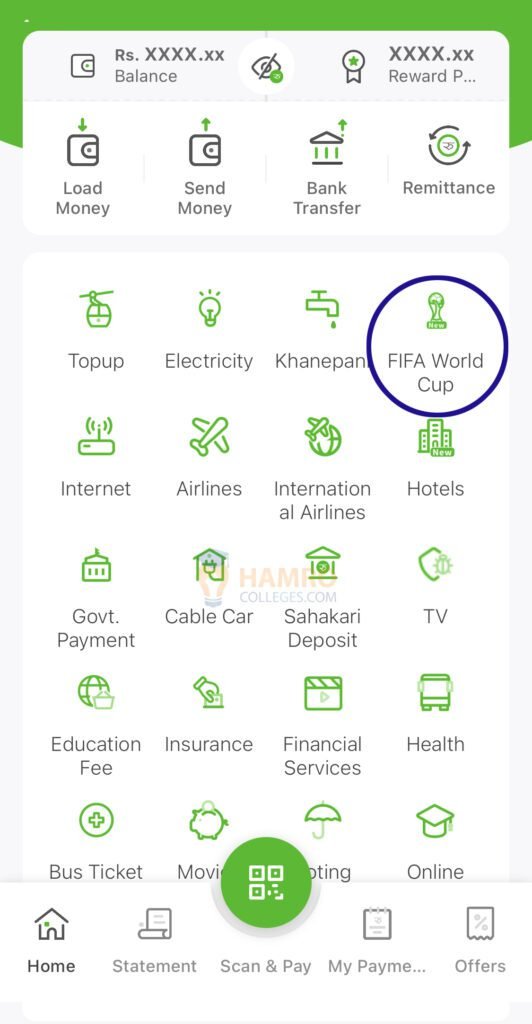
- Now, Tap on the TV you’re watching and make a payment easily.
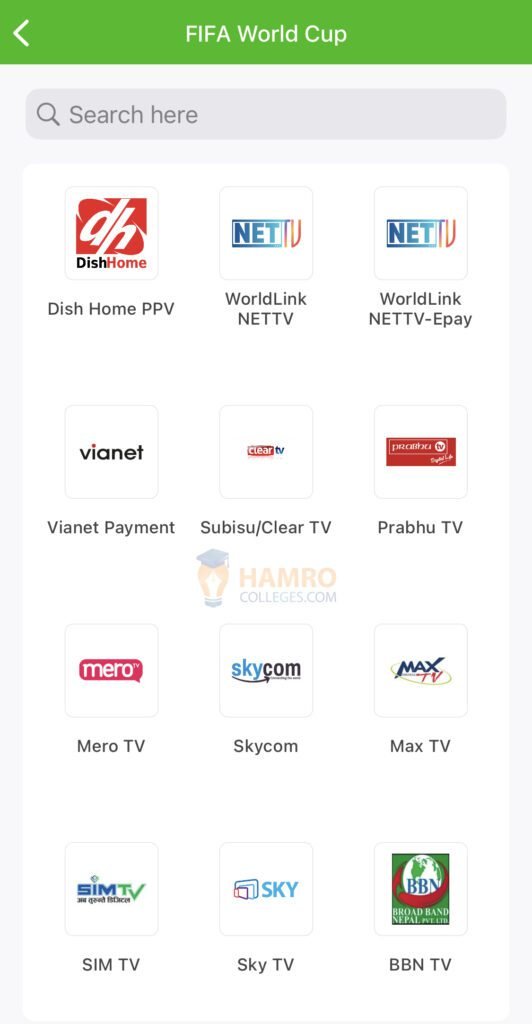
- The procedure is the same for ClearTV, MaxTV, and BBN TV. You may pay the money by immediately entering your User ID, STB number, and Mobile number.
Related Post: Watch LIVE FIFA World Cup 2022 Online in Nepal.
Also Read: How to watch Free FIFA World Cup Online.
USEFUL HAMROCOLLEGES TOOLS
Tools related to this article
KEEP READING